
To scrape Instagram post likers, you copy the link of an Instagram post, paste it into an Instagram likes scraper, and export the people who liked it - with their contact emails - to a CSV. With SocialScraper that’s one URL and one click, with no Instagram login and no code.
Likers are some of the warmest leads on Instagram. They engaged with a specific post, about a specific topic, recently. Scrape the right post and you get a list of people who just raised their hand for exactly what you sell.
How post likers compare with followers
A follower list tells you everyone who chose to follow an account in your niche. A likers list narrows that to who cared about one topic, right now.
| Followers | Post likers | |
|---|---|---|
| Signal | Chose to follow the account | Engaged with one specific post |
| Scope | Lasting interest in the account | As fresh as the post |
| Topic match | Whatever the account covers | Exactly the post’s topic |
| List size | Large - the whole audience | Smaller, tied to one post |
That makes likers ideal for topic-specific offers. Someone who liked a post about launching a Shopify store is a timely prospect for an ecommerce tool, and you can pitch them on that exact topic.
Which posts should you scrape?
Pick posts where the people liking them are your customers:
- Competitor posts. A competitor’s product launch or feature announcement attracts people actively shopping for that kind of product.
- Educational posts in your niche. “5 mistakes new salon owners make” gets likes from salon owners, not the general public.
- Event and conference posts. Likers of a trade-show recap are usually people in that industry.
- Influencer posts aimed at professionals. A business coach’s post about hiring attracts small business owners.
Avoid viral memes and giveaways - they pull likes from everyone, so the share of relevant leads drops.
💡 Tip: posts with a few hundred to a few thousand likes in a tight niche usually beat a viral post with 100,000 likes. Relevance matters more than size.
How to scrape Instagram post likers, step by step
Step 1 - Copy the post URL
On Instagram, open the post, click the ⋯ menu (or the share icon) and choose Copy link. On desktop you can also copy it straight from the address bar. It looks like https://www.instagram.com/p/....
Step 2 - Paste it into Scrape likes
In SocialScraper, open Scrape likes and paste the post URL. Set an optional email limit if you only want a sample.
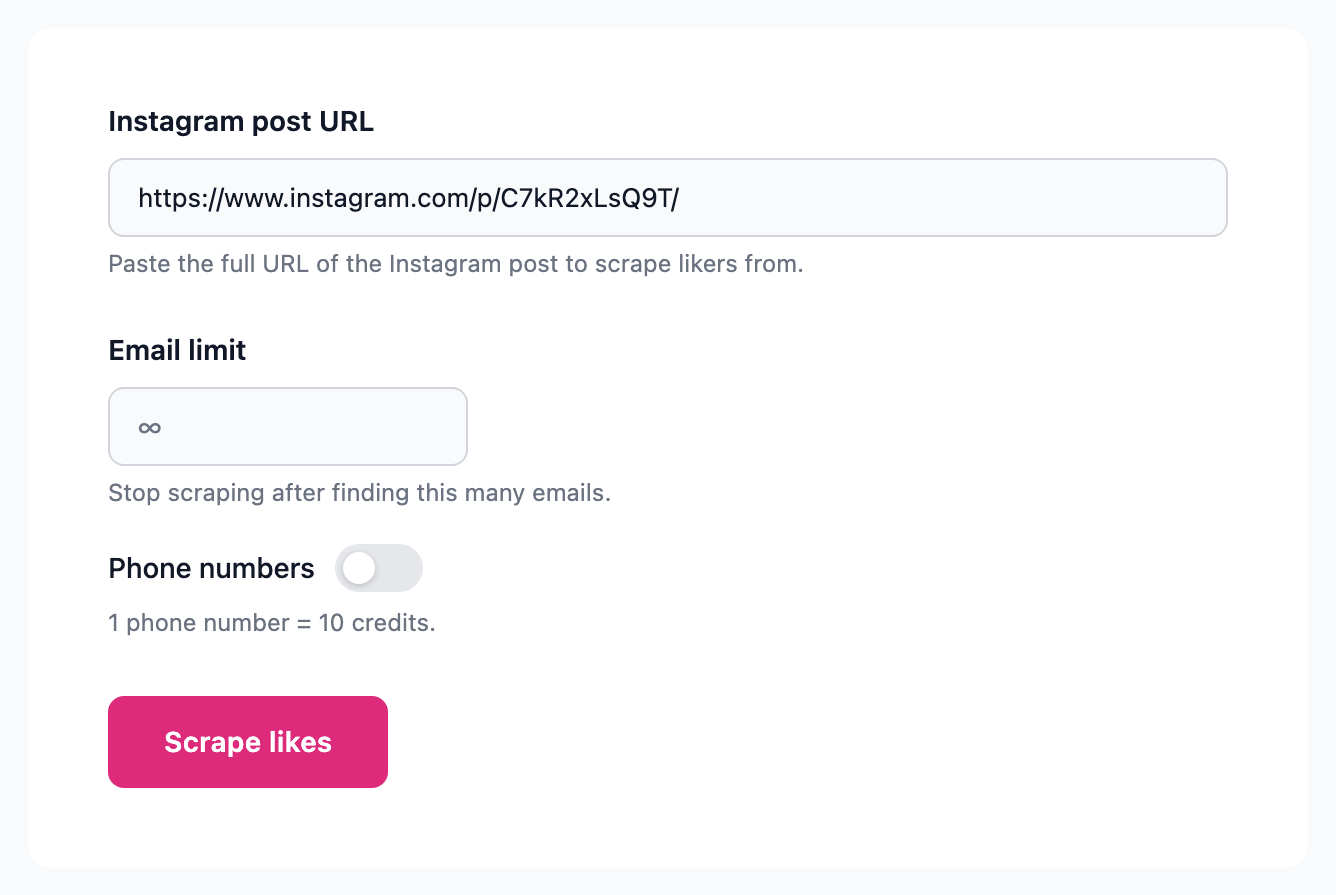
Step 3 - Add phone numbers (optional)
Switch on Phone numbers to also collect phone numbers (1 phone number = 10 credits). See how to scrape phone numbers from Instagram for when that’s worth it.
Step 4 - Run it and export
Click Scrape likes. Progress shows live on your Results page. When it’s done, click View to see every profile and export the CSV - with username, full name, email, website, bio, location and follower count for each liker.
Scraping post likers is a paid-plan feature. Free accounts can see the form and try other sources, like following lists.
Turn likers into replies: the context opener
The biggest advantage of a likers list is that you know why each person is on it. Use that in your first line - without being creepy:
- Weak: “Hi, I saw you liked a post by @brand.”
- Strong: “Hi Sarah - quick one for salon owners juggling bookings during the holiday rush…”
You’re not referencing the like itself. You’re writing about the topic they just showed interest in. Keep one campaign per post (or per group of similar posts) so the message always matches.
What to expect from a likers scrape
- List size depends on the post. You get the likers of that one post, so expect smaller lists than a follower scrape. Run several posts on the same topic to build volume.
- Not every liker will have an email. Hit rates vary by audience, and likers who are businesses and creators usually return more emails than personal accounts.
- You only pay for verified emails. 1 credit = 1 verified email. Likers without an email cost nothing, and you’re never charged twice for a profile you’ve already scraped.
Is it legal to scrape Instagram post likers?
Yes. The likers of a public post are publicly visible on Instagram, and collecting publicly available information is legal. SocialScraper never accesses private accounts, never bypasses logins, and never asks for your Instagram credentials.
- GDPR and CCPA compliant, with a simple opt-out process.
- Zero risk to your account - you never connect your Instagram.
Follow standard cold-email practice when you send: identify yourself, include an unsubscribe link and honour opt-outs. Details are on our legal and compliance page.
More Instagram scraping guides: commenters · followers · hashtags · Reels audio
Frequently asked questions
Can you see who liked an Instagram post?
Yes, for public posts where the like list hasn’t been hidden. Tap the like count under the post to see the list. A likes scraper collects that same list and adds contact details where they’re found.
Can I export Instagram likes to Excel?
Yes. Scrape the post in SocialScraper, open the result with View, and export it as a CSV that opens in Excel or Google Sheets.
Can I scrape likers from any post, not just my own?
Yes. You can scrape the likers of any public post - a competitor’s, an influencer’s or an industry account’s. Private accounts can’t be scraped.
What if the post hides its like count?
Some creators hide like counts. If the like list itself isn’t publicly viewable, it can’t be scraped - try the post’s commenters instead, which are often the most engaged people anyway. See how to scrape Instagram comments.
Are likers or commenters better leads?
Commenters are usually warmer - they took the time to write something. Likers give you bigger lists. Many users scrape both on the same post.
Ready to turn engagement into leads? Start with 10 free verified emails - no credit card required.