
To scrape emails from an Instagram hashtag, you enter the hashtag into an Instagram hashtag scraper, choose its top or most recent posts, and export the people who posted with that hashtag - with their contact emails - to a CSV. In SocialScraper that takes one word and one click, with no Instagram login or code.
Hashtags are how people label their own work. A photographer tags #weddingphotographer, a new store owner tags #shopifystore, a trainer tags #onlinecoach. That makes hashtags one of the most precise ways to find a niche on Instagram - the people tell you what they do.
Why hashtags are great for niche lead lists
Followers of an account show who is interested in a niche. People posting with a niche hashtag add another angle: they are almost always in that niche:
- Self-identified. Someone posting under #realtorlife is very likely a realtor.
- Active right now. Recent hashtag posts come from accounts that are publishing today, not dormant profiles.
- Easy to target by location. City hashtags like #austinrealtor or #londonbarber narrow a niche to one market.
How to choose the right hashtags
Good lead-gen hashtags share three traits: they’re specific, professional, and actively used by businesses rather than fans.
| Hashtag type | Example | Who it surfaces |
|---|---|---|
| Profession | #weddingphotographer, #personaltrainer | People who do that job |
| Profession + city | #miamirealtor, #nycbarber | That job in one market |
| Business stage | #smallbusinessowner, #newshop | Founders and new businesses |
| Industry event | #salonexpo, #saasconference | People working in the industry |
| Product category | #skincarebrand, #handmadejewelry | Brands selling those products |
Avoid broad, consumer hashtags like #love or #travel - they’re full of personal accounts with no business email.
💡 Tip: search the hashtag on Instagram first and look at the top 12 posts. If they’re from businesses and professionals, scrape it. If they’re from fans and personal accounts, add a profession or city to make it more specific.
Top posts vs Recent posts
SocialScraper gives you two feed types for every hashtag:
- Top Posts - the hashtag’s most popular posts. Great for finding established accounts with real audiences. Progress is tracked live.
- Recent Posts - the newest posts under the hashtag. Great for catching people who are active today, including new businesses. There’s no live progress bar for this feed type, but the scrape still lands in Results like any other.
If you’re not sure, start with Top Posts to gauge the quality of a hashtag, then run Recent Posts for fresher, more time-sensitive leads.
How to scrape emails from an Instagram hashtag, step by step
Step 1 - Open Scrape hashtag
In SocialScraper, choose Scrape hashtag from the sidebar.
Step 2 - Enter the hashtag and feed type
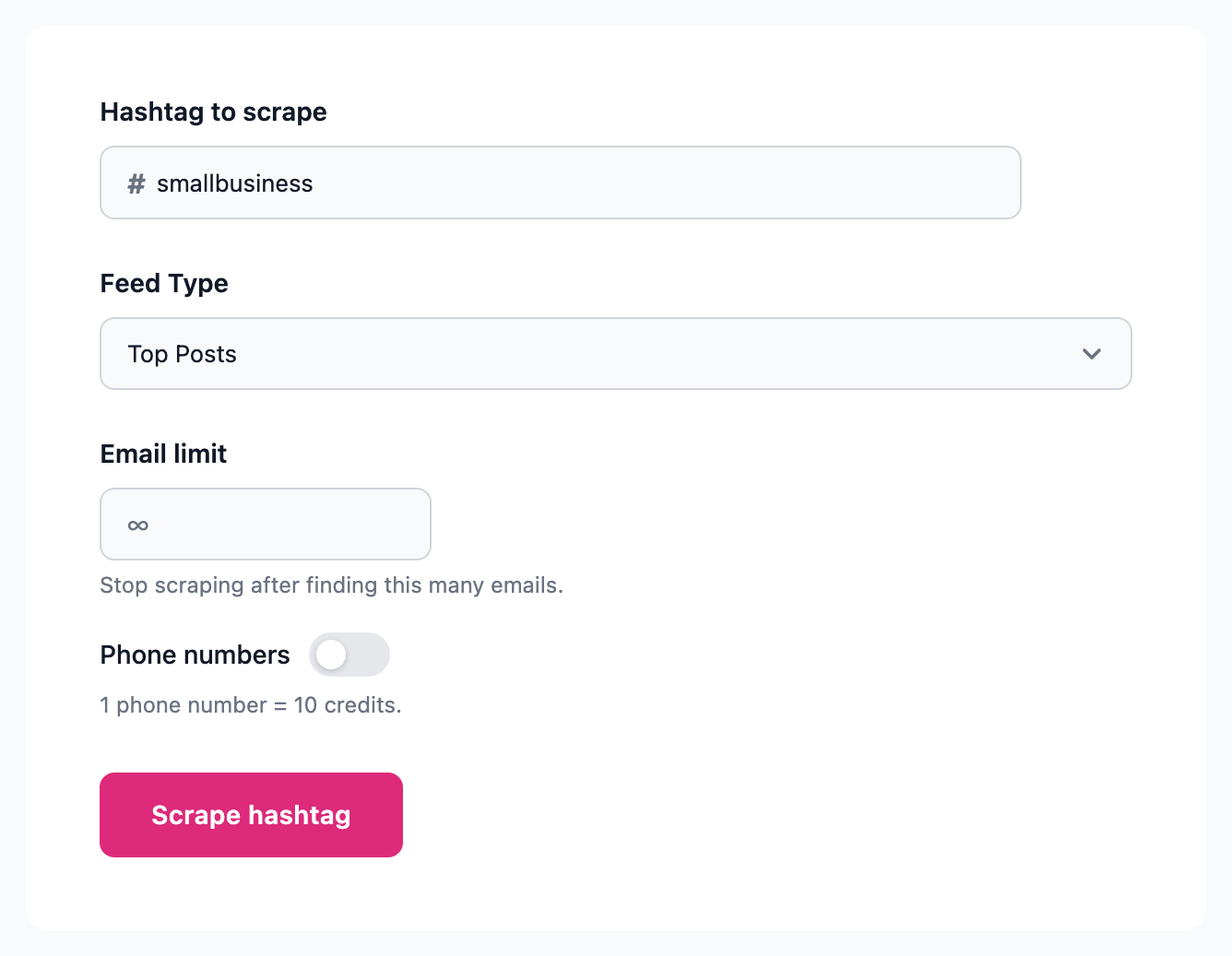
Type the hashtag without the # (for example smallbusiness), and pick Top Posts or Recent Posts. Set an optional email limit for a test run.
Step 3 - Add phone numbers (optional)
Turn on Phone numbers to collect phone numbers too (1 phone number = 10 credits) - especially useful for local services like salons, gyms and contractors. See our phone number guide.
Step 4 - Run and export
Click Scrape hashtag. When the scrape finishes, open it with View and export the CSV with each person’s username, full name, email, website, bio, location and follower count.
Hashtag scraping is included on every paid plan.
Stack hashtags for a bigger, cleaner list
One hashtag rarely covers a whole niche. Build a list the way pros do:
- Pick 3-5 related hashtags (e.g. #weddingphotographer, #elopementphotographer, #destinationwedding).
- Scrape each one, using Top Posts first.
- Combine the exports - SocialScraper never charges you twice for a profile you’ve already scraped, so overlap between hashtags is free.
- Filter by bio keywords or follower count in Google Sheets to keep only your best-fit leads.
For worked examples, our niche playbooks list the exact hashtags to use for photographers and wedding vendors, gyms and personal trainers and med spas and salons.
Is it legal to scrape Instagram hashtags?
Yes. Hashtag pages and the posts on them are public, and collecting publicly available information is legal. SocialScraper never accesses private accounts or bypasses logins, and never asks for your Instagram credentials.
- GDPR and CCPA compliant, with a simple opt-out process.
- Zero risk to your account - you never connect your Instagram.
When you send to the list, identify yourself, include an unsubscribe link and honour opt-outs. See our legal and compliance page.
More Instagram scraping guides: locations · Reels audio · commenters · followers
Frequently asked questions
Can you scrape emails from an Instagram hashtag?
Yes. A hashtag scraper collects the profiles posting under a hashtag and exports the ones with a contact email. In SocialScraper you enter the hashtag, pick Top or Recent posts, and export a CSV of verified emails.
What’s the difference between Top Posts and Recent Posts?
Top Posts covers a hashtag’s most popular posts - usually established accounts. Recent Posts covers the newest posts - people active right now. Progress tracking is only available for Top Posts.
How many emails will I get from a hashtag?
It depends on how professional the hashtag is. Business hashtags like #realtor or #salonowner yield far more emails than consumer hashtags. Run a small test with an email limit to see the yield before scaling.
Can I scrape a hashtag for a specific city?
Yes - use a city-specific hashtag like #chicagorealtor. For even more precise local targeting, scrape an Instagram location instead - see how to scrape Instagram locations.
Do I pay for posts without an email?
No. 1 credit = 1 verified email. Profiles without an email, and duplicates, are free.
Ready to build a niche list from a hashtag? Start with 10 free verified emails - no credit card required.