
To get emails from a list of Instagram usernames, you upload the list (a CSV, TXT or Excel file) or paste the handles into an Instagram profile scraper, and it returns a contact email for each profile where one is found, plus profile data, in a single CSV. In SocialScraper that’s Scrape profiles → Bulk - one upload, one click, no Instagram login.
Sometimes you already know exactly who you want to reach: a list of influencers from a past campaign, exhibitors from an event, brands from a directory, or accounts your team collected by hand. Looking up each profile one by one is slow. A bulk scrape enriches the whole list at once.
When to scrape a list of usernames
A custom list is the right tool whenever you choose the accounts, rather than pulling them from someone’s followers or a hashtag:
| Situation | Example list |
|---|---|
| Influencer and UGC outreach | Creators your team shortlisted from Reels and hashtags |
| Event follow-up | Exhibitors and speakers tagged in an event’s posts |
| Directory or marketplace research | Brands listed on a directory, by their Instagram handle |
| Refreshing old data | Last year’s partner list - check who’s grown and get current contacts |
| Account-based outreach | 50 dream clients you want to reach personally |
💡 Tip: combine sources. Scrape a hashtag or a following list first, shortlist the best accounts in a spreadsheet, then re-run just that shortlist as a custom list to keep your campaigns organised by name.
How to get emails from a list of Instagram usernames, step by step
Step 1 - Prepare your list
Put one Instagram username per row - in a CSV, a TXT file, an Excel file, or straight into the text box. Leave out the @ symbol. If your file has several columns (name, website, notes…), that’s fine: you’ll pick the column that holds the usernames.
Step 2 - Open Scrape profiles and choose Bulk
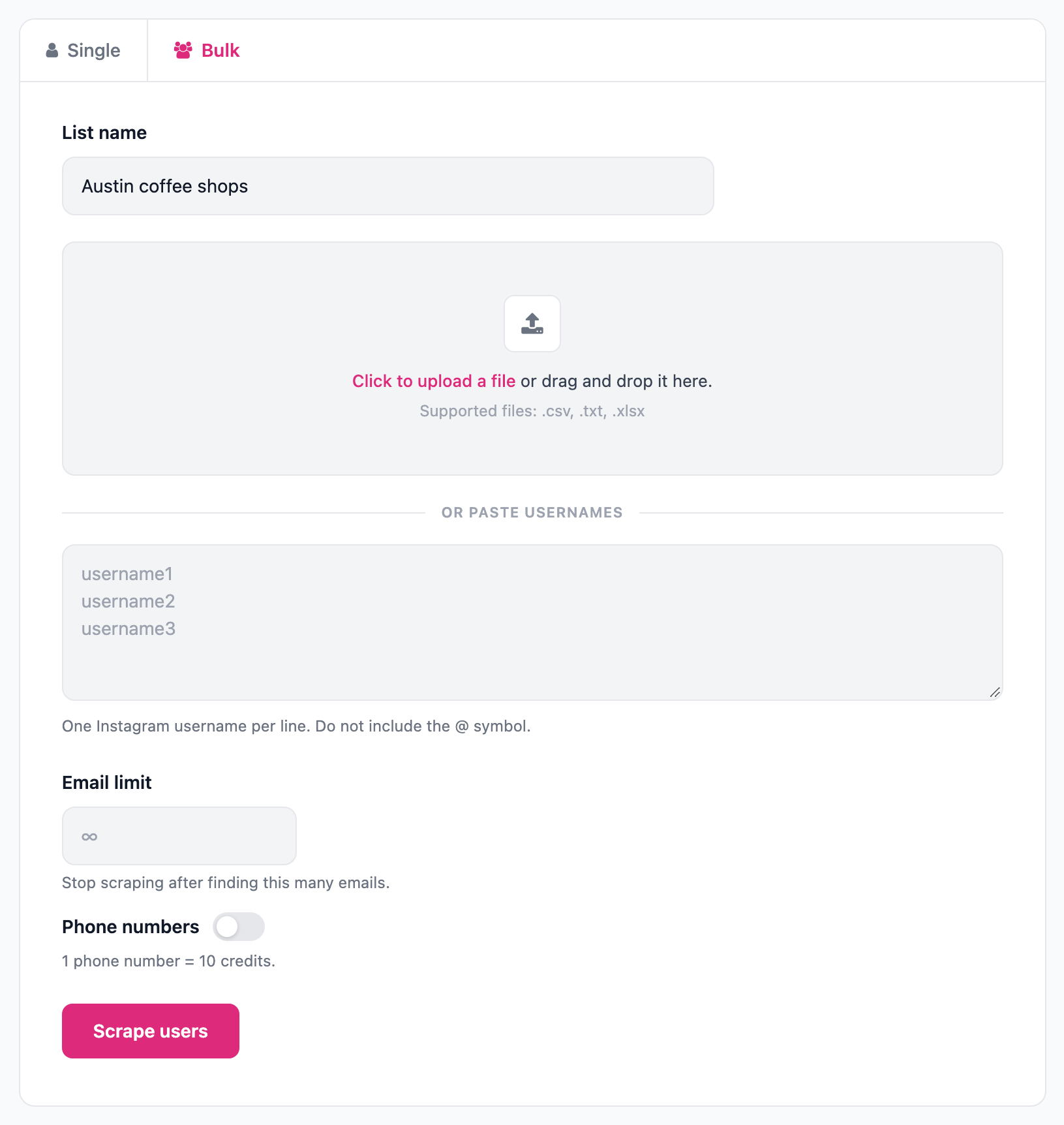
In SocialScraper, open Scrape profiles and switch to the Bulk tab. Give the list a name - for example “Austin coffee shops” - so it’s easy to find in your Results later.
Step 3 - Upload the file or paste the usernames
Drag in your .csv, .txt or .xlsx file and select the column containing the usernames, or paste the handles into the box, one per line. Set an optional email limit if you only want part of the list.
Need a single profile instead? The Single tab looks up one username at a time.
Step 4 - Add phone numbers (optional)
On paid plans, switch on Phone numbers to also collect phone numbers (1 phone number = 10 credits). See how to scrape phone numbers from Instagram.
Step 5 - Run and export
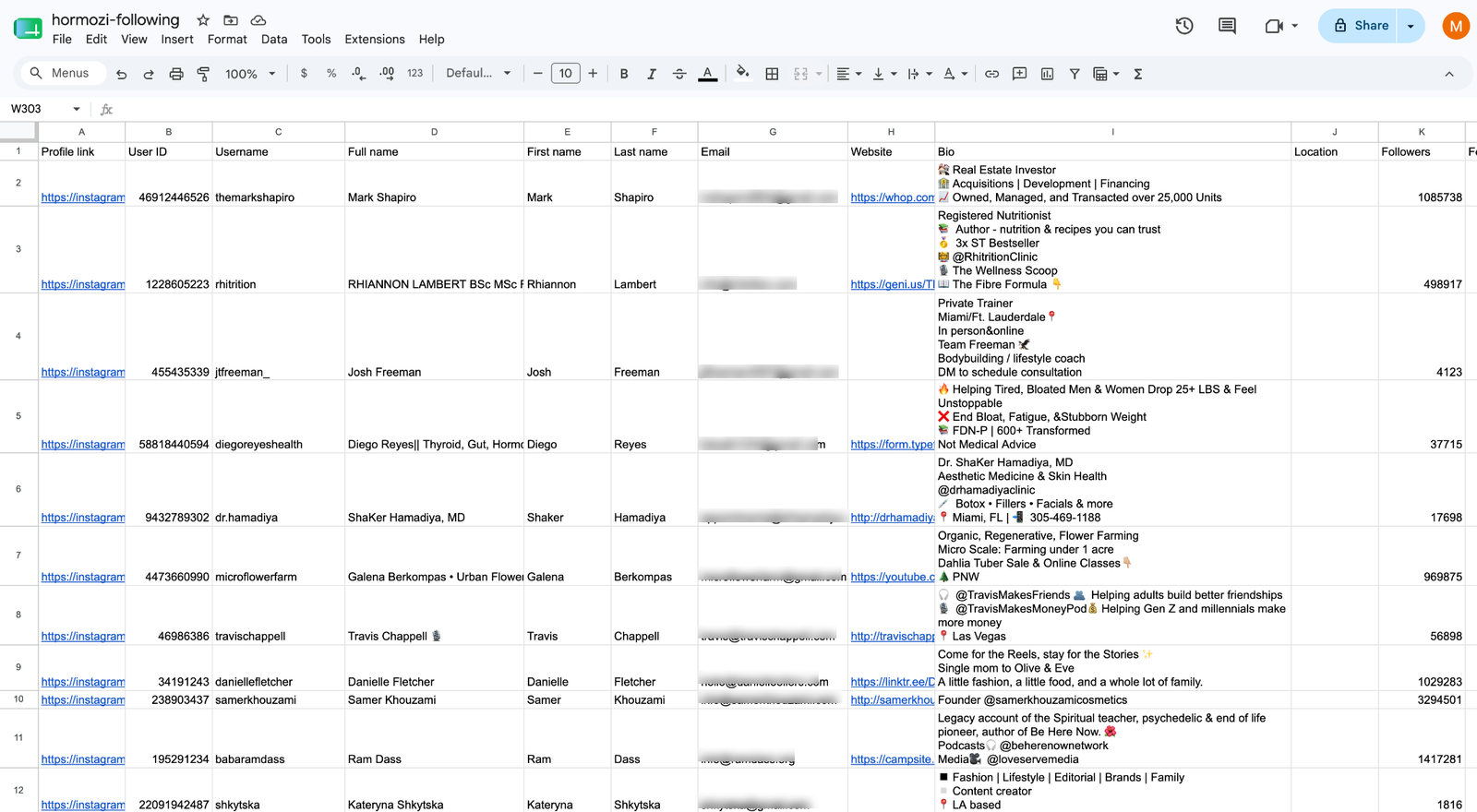
Click Scrape users. Your list appears on the Results page under the name you gave it. When it’s done, click View and export the CSV - each row has the profile link, username, full name, email, website, bio, location and follower count.
Get emails from your list free
Tips for a clean list
- Remove @ signs and URLs. Use plain handles like
bluebottlecoffee, not@bluebottlecoffeeor a full profile link. - One handle per row. Extra spaces and blank lines are fine to leave out.
- De-duplicate first if you can - though SocialScraper never charges you twice for a profile you’ve already scraped.
- Use the follower count column. The export includes current follower counts, so you can re-sort a creator list by size or spot who has grown since your last campaign.
What to expect
- You get a row for every profile in the list that can be found, with its profile data.
- Not every account will have an email. Hit rates vary by list, and business and creator accounts tend to do better than personal ones. Private accounts can’t be scraped.
- You only pay for verified emails. 1 credit = 1 verified email. Profiles without an email cost nothing, so a list where only half the accounts have emails simply costs half as much.
Is it legal to look up emails from Instagram usernames?
Yes. Collecting publicly available profile information is generally legal. SocialScraper never accesses private accounts or bypasses logins, and never asks for your Instagram credentials.
- GDPR and CCPA compliant, with a simple opt-out process.
- Zero risk to your account - you never connect your Instagram.
When you email the list, identify yourself, include an unsubscribe link and honour opt-outs. See our legal and compliance page.
More Instagram scraping guides: following lists · followers · hashtags · best Instagram email scrapers
Frequently asked questions
Can I upload a CSV of Instagram usernames?
Yes. Scrape profiles → Bulk accepts .csv, .txt and .xlsx files. Choose the column that contains the usernames and start the scrape.
How do I find the email of an Instagram user?
Run the username through a profile scraper, which returns a contact email where one is found, plus the profile data. For one account, use the Single tab; for many, use Bulk.
Is scraping a list of profiles free?
Scrape profiles is available on the free plan, which includes 10 free verified emails. Paid plans start at $49/month for 1,000 emails.
Should I include the @ in usernames?
No - enter plain usernames, one per line, without the @ symbol.
Can I scrape private Instagram accounts?
No. Only public profiles can be scraped. Private accounts in your list are skipped.
Ready to turn your list into contacts? Start with 10 free verified emails - no credit card required.